Yesterday I had some time left and thought it was the perfect moment to write a very simple live blog to learn more about WebSockets (in Go).
Go
WebSockets are actually very easy in Go, they work just like the http handler. The required websocket package is not installed by default, but you can easily install the (by Go maintained) package: go get code.google.com/p/go.net/websocket.
Time to create a websocket handler:
func main() {
    http.Handle("/", websocket.Handler(HandleSocket))

    if err := http.ListenAndServe(":1234", nil); err != nil {
        log.Fatal("ListenAndServe:", err)
    }
}
In the above snippet, HandleSocket is the name of your own defined handler function. In this easy example I created a handler function that will just send all received message on a socket back:
func HandleSocket(ws *websocket.Conn) {

    // Wait for incoming websocket messages
    for {
        var reply string

        if err := websocket.Message.Receive(ws, &reply); err != nil {
            log.Println("Can't receive from socket:", err)
            break
        }

        log.Println("Received back from client: " + reply)

        msg := "Received:  " + reply
        log.Println("Sending to client: " + msg)

        if err := websocket.Message.Send(ws, msg); err != nil {
            log.Println("Can't send to socket:", err)
            break
        }
    }
}
Of course I enhanced this Go code to create an actual liveblog demo.
Javascript
Now we have our websocket, we must actually do something with it in Javascript. The most simple implementation will prepend any new message to an html list with id messages:
var sock = null;
var wsuri = "ws://localhost:1234";

window.onload = function() {

    sock = new WebSocket(wsuri);

    sock.onopen = function() {
        console.log("connected to " + wsuri);
    }

    sock.onclose = function(e) {
        console.log("connection closed (" + e.code + ")");
    }

    sock.onmessage = function(e) {
        $('<li>' + e.data '</li>').hide().prependTo('#messages').fadeIn(1000);
    }
};
We must also be able to send messages from an admin panel:
function send() {
    var msg = document.getElementById('new_message').value;
    document.getElementById('new_message').value = '';
    sock.send(msg);
};
Liveblog
I combined the above little pieces to create a simple liveblog. The blog has an admin page on which someone can add messages, which are then broadcasted to all the other sockets.
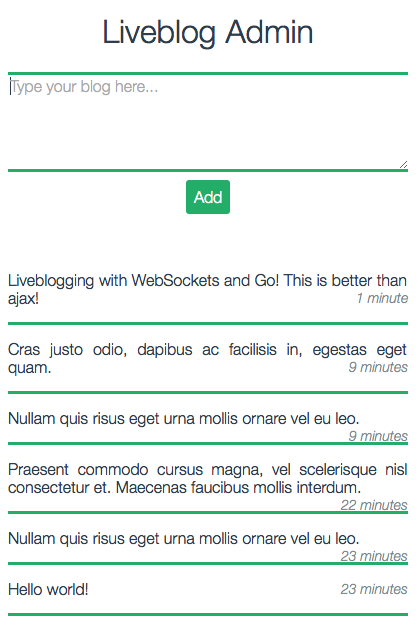
The source code of the demo is available on Github: github.com/DenBeke/Liveblog


Hi, I’ve changed the ws URI and the port number to my own. But I constantly get this error: failed: Error during WebSocket handshake: Unexpected response code: 200. What did I do wrong? Thanks
The ports of the websocket in Javascript must match the server in Go. Are you sure you changed it in both places?
Is this what you mean? I’ve changed the wsuri in the js file, and also the port number from 1234 to 8888 (in the main.go file).
You’re need to make sure that your websocket url (+ port) in JS point to a websocket endpoint, and to to a regular HTTP. In your example it seems that you’re just trying to connect to your HTTP server using websockets, which will of course not work.
That
200status code is a regular HTTP status code (means “ok”) which is useless for websockets.Yes I thought I was doing something wrong there with the websocket… Am I correct you speak Dutch (I’m from Belgium, so that would be easier)? Is there some way I can contact you in a different way than this? Because I’m just a student who didn’t work with websockets before and it’s kind of embarrassing to tell you all my problems on this platform :p I see your explanations are really clear, but it’s just the first step I don’t get: how do I ‘run’ a websocket (server)? Because I don’t know how Go works as well (I’ve read some documentation about it, but the only thing I managed to do was installing Go, I guess). Thanks!!
I’m in the Gophers slack channel: https://blog.gopheracademy.com/gophers-slack-community/
Search for me there, or just post some public question in the Belgium channel and I’ll find you…